

Safety features in the Amazon Flex app
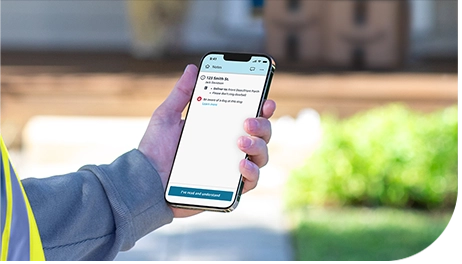
At Amazon Flex, we are always working to help you and the communities you serve stay safe. There are several safety features in the Amazon Flex app you can use when you deliver. For even more safety resources, visit the Resource Portal in the Amazon Flex app or our safety webpage.
Customer chat
The customer contact option in the Amazon Flex app lets you reach out to customers with delivery questions through an Amazon number, rather than your personal phone number. This helps you get the information you need to make a successful delivery while keeping your personal phone number private.
Dog alerts
A paw print icon in the Amazon Flex app delivery notes tells you there might be a dog at that location based on reports from customers or delivery partners. If you see a paw print icon, you will also find related safety suggestions you can use when you arrive. If a dog is present at a delivery location without a paw print icon, you can easily add one to help alert fellow delivery partners by tapping the ‘?’ icon in the top right corner of the app, then ‘Report a dog on your route’ whilst at the delivery location.
Dark mode
Dark Mode changes the colour contrast in the Amazon Flex app in low-light environments. This helps reduce eye strain and makes it easier to see the screen.
Optimised maps
Maps in the Amazon Flex app include several safety features. Maps display known speed limits and road closure alerts, in addition to live traffic conditions. You can also download maps from the Amazon Flex app to help you reliably get where you’re going even when you're offline.
Emergency assistance
If you have an emergency when you are delivering, the “Emergency Help” button gives you the option to contact 999 or the Amazon Emergency Helpline for assistance reporting a safety concern or accident. If you need emergency services, always call 999 before contacting the Amazon Emergency Helpline.
If you arrive at a delivery location and do not feel safe, you can contact Support through the Amazon Flex app. You are never expected to make a delivery if you feel unsafe.
Related Blog Posts
Navigating the package returns process with ease
Deliver by e-bike and earn on your schedule with Amazon Now

Making a positive impact through community deliveries

Staying safe in hot weather months
Using Substitutes for your Amazon Flex delivery block
Your guide to Amazon Flex earnings
Download the Amazon Flex app
Create an account to set your schedule, see your earnings upfront, and start delivering with confidence.